 Shoopy
Ecommerce business setup in India and how to start with your own store (2026)
Ecommerce business setup in India: GST, a bank account, a payment gateway and your own store, and why a sale of goods to another state needs a GSTIN.
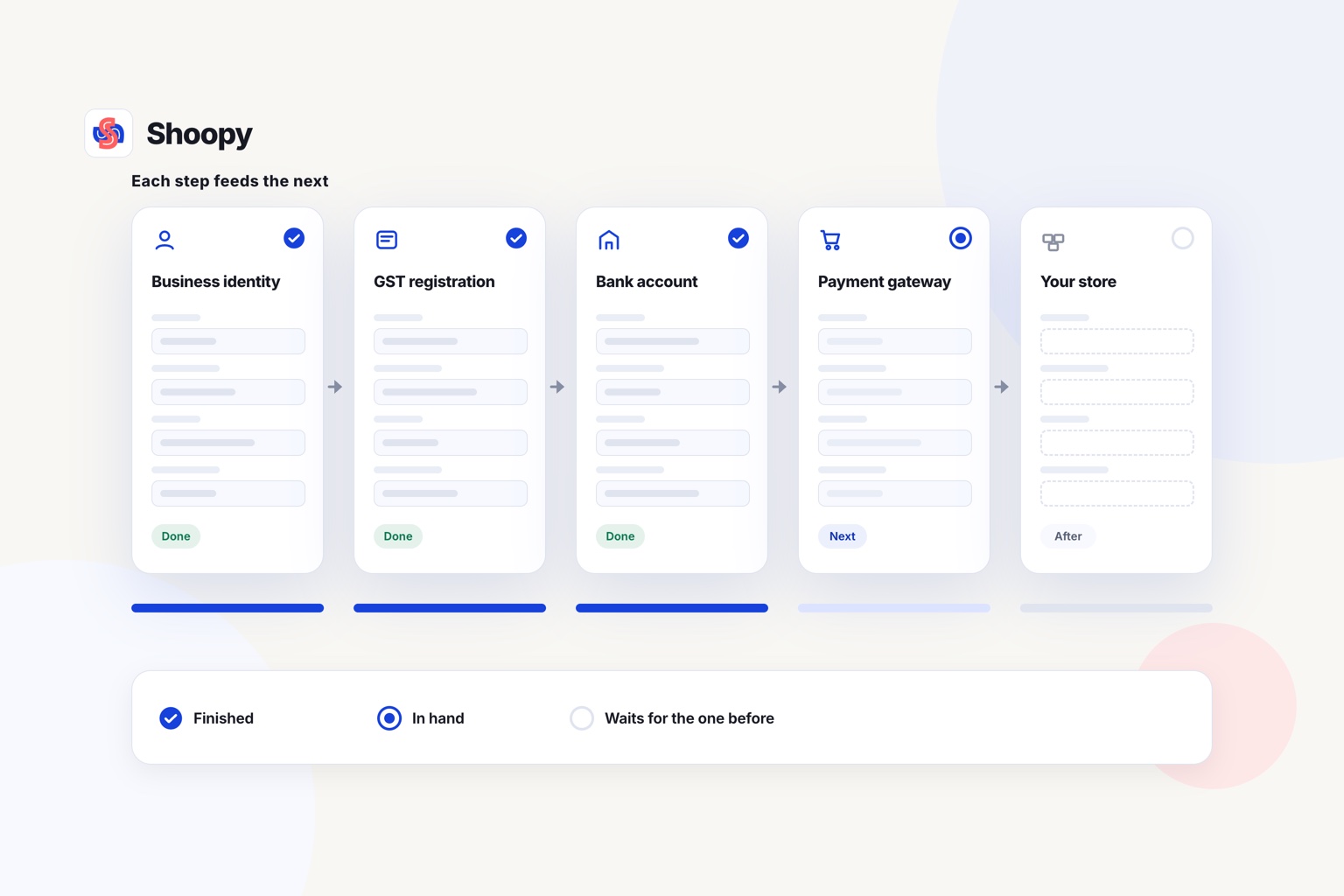
Quick Answer: Ecommerce business setup in India runs in order: business identity, GST registration where required, a current account, a payment gateway, then your store. Selling goods to another state needs GST registration from the first sale. Shoopy covers the store step, with GST invoices on every plan; plans and current prices are on the pricing page.
An ecommerce business setup in India is a fixed sequence, and each step feeds the next. The GSTIN comes from the business identity, the bank account carries the business name, and the gateway and the store both come after those. The business-setup sequence comes first here; building the storefront itself is a separate job.
What official registrations does an ecommerce business setup in India need?
You need a business identity and a GSTIN where GST law requires one; Udyam registration is optional and gives you MSME status. Whether you need a GSTIN depends on what you sell, how much, and where you ship, as the rules below set out. Get the structure and the GSTIN right first, and the bank account, gateway, and store all follow.
Which GST rules decide whether you must register?
Under GST, a business that sells only goods must register once its turnover passes ₹40 lakh a year in most states, as of October 2026 (Notification 10/2019-Central Tax); a shop that sells ice cream, pan masala or tobacco cannot use the ₹40 lakh limit. The limit is lower in ten states and union territories, among them Telangana, Uttarakhand, Puducherry and every north-eastern state except Assam, so check the figure for your state. A business that supplies services registers past ₹20 lakh (₹10 lakh in Manipur, Mizoram, Nagaland and Tripura), as of October 2026. Two common cases need registration whatever the turnover: selling goods to a buyer in another state (section 24 of the CGST Act; notified handicraft goods aside), and selling goods through a marketplace that collects tax at source, unless you sell within one state only, stay within the section 22 limit (₹20 lakh in most states, as of October 2026) and take an enrolment number on the GST portal instead (Notification 34/2023-Central Tax). The compulsory cases are listed in section 24 of the 2017 Act, and the CBIC, the GST authority, publishes the current registration and invoicing duties.
Do you need Udyam registration, a company or a licence too?
Udyam registration is the MSME register, done on the government’s Udyam portal. It is free, paperless and based on self-declaration, no documents are uploaded, and the registration never needs renewal. It needs an Aadhaar number and a PAN, plus a GSTIN if GST law requires you to have one; investment and turnover details are pulled from government databases.
The business structure is a separate choice: sole proprietorship, partnership, LLP, or private company. Whichever you pick, the GSTIN, the current account, and the gateway checks all use that name. A manufacturer and a service business can also sit under one registration. Some products need a sector licence on top: a food seller needs an FSSAI licence or registration under section 31 of the Food Safety and Standards Act, 2006 before it starts.
What are the steps to start an ecommerce business in India?
The steps run in a fixed order, and each one needs the one before it. The GST application, where you need one, goes through the GST portal, and the gateway and the store open after it. Here is the sequence:
- Pick the business structure and get the identity documents ready: PAN for the business and the owner, address proof, and photographs.
- Register for GST on the GST portal if the rules above apply, and receive the GSTIN.
- Open a current account in the business name, so gateway settlements land apart from your personal money.
- Register on the Udyam portal if you want MSME status. It is free and needs your Aadhaar number and PAN.
- Connect a payment gateway and complete its checks with the PAN, the GSTIN if you have one, and the bank details.
- Build the catalogue with prices, tax rates, and HSN codes for goods.
- Launch your own store on your domain, place a test order, and only then tell customers.
How do you open a bank account and connect a payment gateway?
The current account comes first, in the exact registered name of the business. A payment gateway is the service that collects card and UPI payments at checkout and settles the money into that account. Before it activates your account, the gateway checks your business details, so the registrations and the bank account need to be in place first.
Cash on delivery needs no gateway, because the courier collects the money at the door. It still needs the same registrations as a prepaid sale, because GST follows the sale, not the way it is paid. A store can offer both prepaid and cash on delivery, so a buyer who has not bought from you before can still order.
How do you build the catalogue and set up delivery?
The catalogue is one product list with everything a bill needs: price, tax rate, and HSN code for goods. Once you are GST-registered, section 31 of the 2017 Act requires a tax invoice before or at the time of removal or delivery of taxable goods, showing the description, quantity, value, and the tax charged. Within a state the tax is CGST plus SGST; between states it is IGST. If the tax detail lives only in your accounting sheet and not in the catalogue, month-end becomes a reconstruction.
Shoopy, a commerce platform from Clevup Technologies Pvt. Ltd., is built around this: once you are registered, the store issues a GST invoice on every online order, with CGST, SGST and IGST and HSN codes, and can export GSTR-1 data. It validates a business buyer’s GSTIN, takes online payments through Razorpay, PayU or Cashfree, and puts the online store on your own domain on every plan, at the plan prices on its pricing page. Our guide to setting up GST on your bills walks the invoice fields.
Delivery is the last piece. Choose a courier partner, and decide the delivery charge and the return window before launch, not after the first complaint.
What does each platform cost, and how do you choose?
₹0 is the lowest entry price, because WooCommerce’s core platform is free, as of October 2026. From there the models split: some platforms bill monthly, some yearly, and some add a fee on every order. The table below reads each vendor’s own pricing page, and our guide to platforms to create an online store compares the build choices.
| Platform | Entry price | Order fees | Notes |
|---|---|---|---|
| Shopify (India) | Basic at ₹1,499/mo billed yearly, or ₹1,994/mo monthly, as of October 2026 | 2% on Basic with a third-party payment provider (1% Grow, 0.6% Advanced), as of October 2026 | 3-day free trial, then ₹20/mo for the first 3 months |
| Dukaan | Starter at ₹2,500/year, as of October 2026 | Service fee of 3.99% on Starter, capped at ₹200 per order; not applicable on manual orders | A ₹0 plan with one online store |
| WooCommerce | Core platform free, no monthly subscription, as of October 2026 | None from WooCommerce; you pay your processor’s fees | Hosting $25 to $350/month for most stores; extensions $29 to $299/year each |
| Shoopy | Yearly plans; current prices on the pricing page | A fee-free order allowance each year, then a small capped fee per order; see the pricing page | Yearly plans; 14-day free trial on every paid plan |
Read from each vendor’s own page in October 2026.
Prices, plans and features of other platforms in this article were read from each vendor’s own pages in October 2026 and can change.
Sort by the kind of business, not by rank. A seller who wants month-to-month billing and a large app market may prefer Shopify’s monthly plans. A seller comfortable running hosting and updates may prefer WooCommerce’s free core. Shoopy’s plans are yearly, with a capped per-order fee only past the plan’s order limit, which suits a seller who wants one yearly price.
Which setup steps go wrong when done out of order?
Most setup failures come from doing the steps out of order, not from doing them badly. Each failure has a plain fix.
- Applying for the gateway before the GSTIN, when you need one. The gateway checks your business details before it activates payments. If the GST rules above require you to register, do it first, so the record is ready.
- Two catalogues. Tax details kept only in the counter list never reach the website, so the online invoice is wrong. Keep one catalogue and let the store read it.
- A personal bank account. Settlements mix with household money, and month-end sorting takes longer. Open the current account before the gateway.
- No test order. The first real customer finds the broken checkout. Place a test order, pay a rupee if you must, and refund it.
- Delivery decided late. You promise free delivery, then meet the courier’s bill. Fix the delivery charge and return window before launch.
What does running the business look like after setup?
Once the registrations, gateway, catalogue, and courier are live, the setup is done and the running begins: orders to fulfil, stock to count, and invoices to file. If you want the store, the counter billing, and the stock on one catalogue, you can see how the online store works and book a demo.
Frequently asked questions
Can I start selling before my GST registration is approved?
Only if you do not yet need a GSTIN. If the turnover limit or one of the compulsory cases in the GST rules above applies to you, build the store and the catalogue while the application is pending, and open orders only after the GSTIN arrives.
Is Udyam registration compulsory for an online store?
No, it is not a precondition for selling online. One enterprise files only one Udyam registration, but any number of activities, manufacturing or service or both, may be added to that single registration. It is free, paperless, and based on self-declaration, with no renewal ever needed.
Does selling on a marketplace remove any of these steps?
No. The GST duties stay with you. The operator collects tax at source under section 52, and you must register unless you sell goods within one state only, stay within the section 22 limit (₹20 lakh in most states, as of October 2026) and hold an enrolment number (Notification 34/2023-Central Tax). Your own store adds your domain, customers and invoices.
Do I need a payment gateway to accept UPI?
Yes, for online UPI collections at checkout. A payment gateway collects the UPI payment and settles it into your bank account after checking your business details. Cash on delivery instead is collected by the courier at the door, with no gateway in between.
Does every small order need a GST invoice?
Not always. Section 31(3)(b) of the CGST Act lets a registered seller skip the invoice on a supply under ₹200, as of October 2026, only if the buyer is unregistered and does not ask for one; rule 46 then requires a consolidated invoice for those sales each day. A composition taxpayer issues a bill of supply instead.
Can Shoopy’s team set up the store for a new business?
Yes. Store setup by Shoopy’s team comes with the Business plan, which also includes a free .in domain for the first year. On Basic and Professional it is a one-time add-on, as of October 2026. You still bring the GSTIN, the bank details for the gateway and your product spreadsheet.