 Shoopy
 Retail chains
Several branches under one brand, each billing customers and holding its own stock, with head office watching the whole picture.
Every location sells from the same catalogue, counts its own stock, and reports into the same dashboard. Growing to the next shop does not mean another disconnected system.
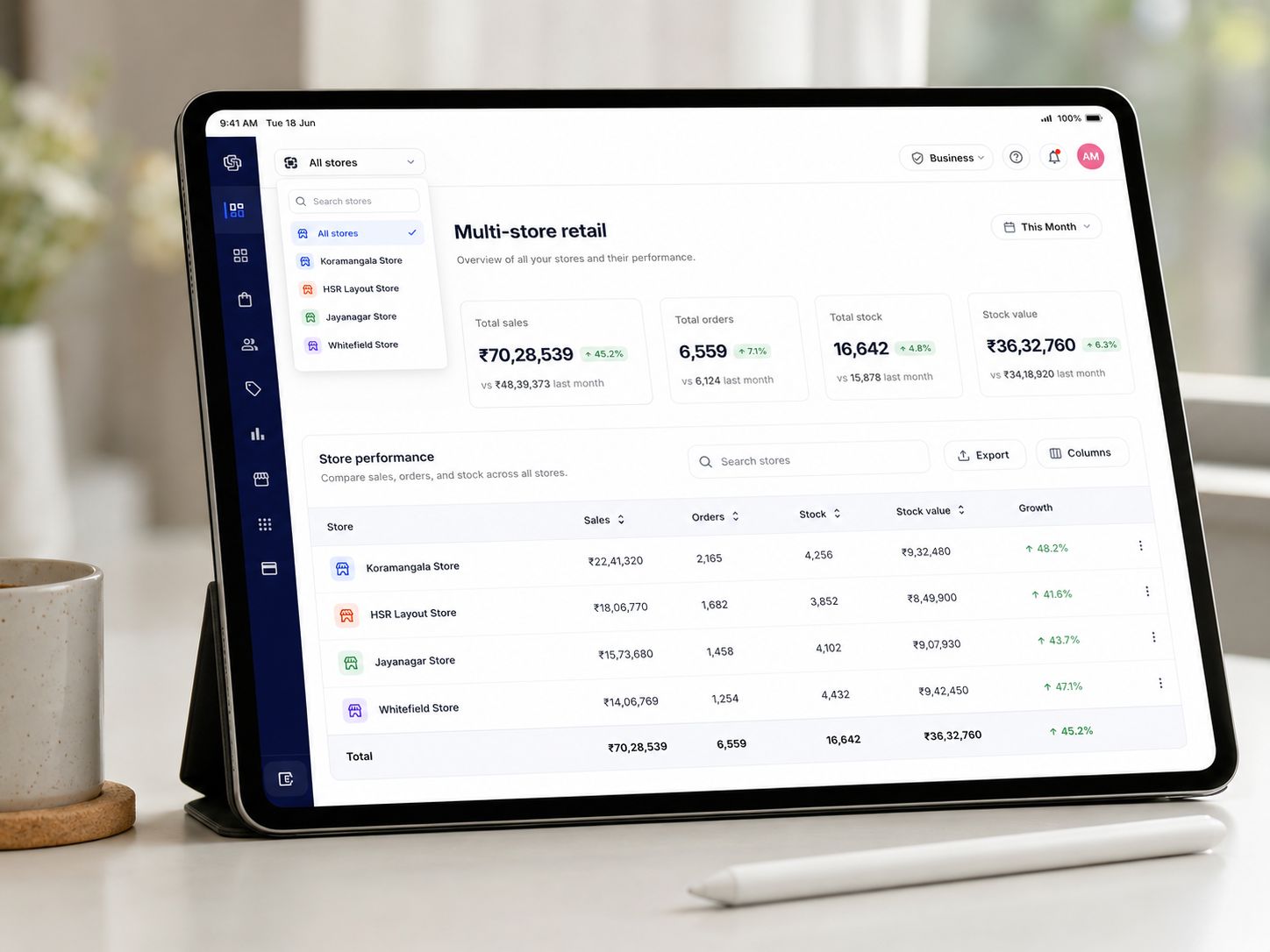
Shoopy is an India-first ecommerce platform for businesses with more than one location. One online store and counter billing for every shop, warehouse and outlet: a single catalogue with central prices, stock counted per location, staff roles scoped to their own location, and sales reported across stores. It supports location-based setups where the outlet that serves the customer’s area fulfils the order.
If your answer to “where is this product?” names a shop, not a shelf, this is your kind of page.
Several branches under one brand, each billing customers and holding its own stock, with head office watching the whole picture.
One brand and price list from the centre; each franchise outlet runs its own stock and fulfils its own orders.
Products that must be delivered from nearby — the outlet closest to the customer holds the stock and serves the order.
Fast-moving stock in every branch, counted where it sits, so the website never promises a shelf that is empty.
Branch-level stock accuracy, staff logins per branch, and one catalogue so prices never drift between outlets.
The smallest multi-location business there is. Two stock counts, one catalogue, one order list — and the same system when shop three opens.
The online store, the branded apps and every counter read the same catalogue. Stock is the only thing counted per location — prices, products and reports stay central.
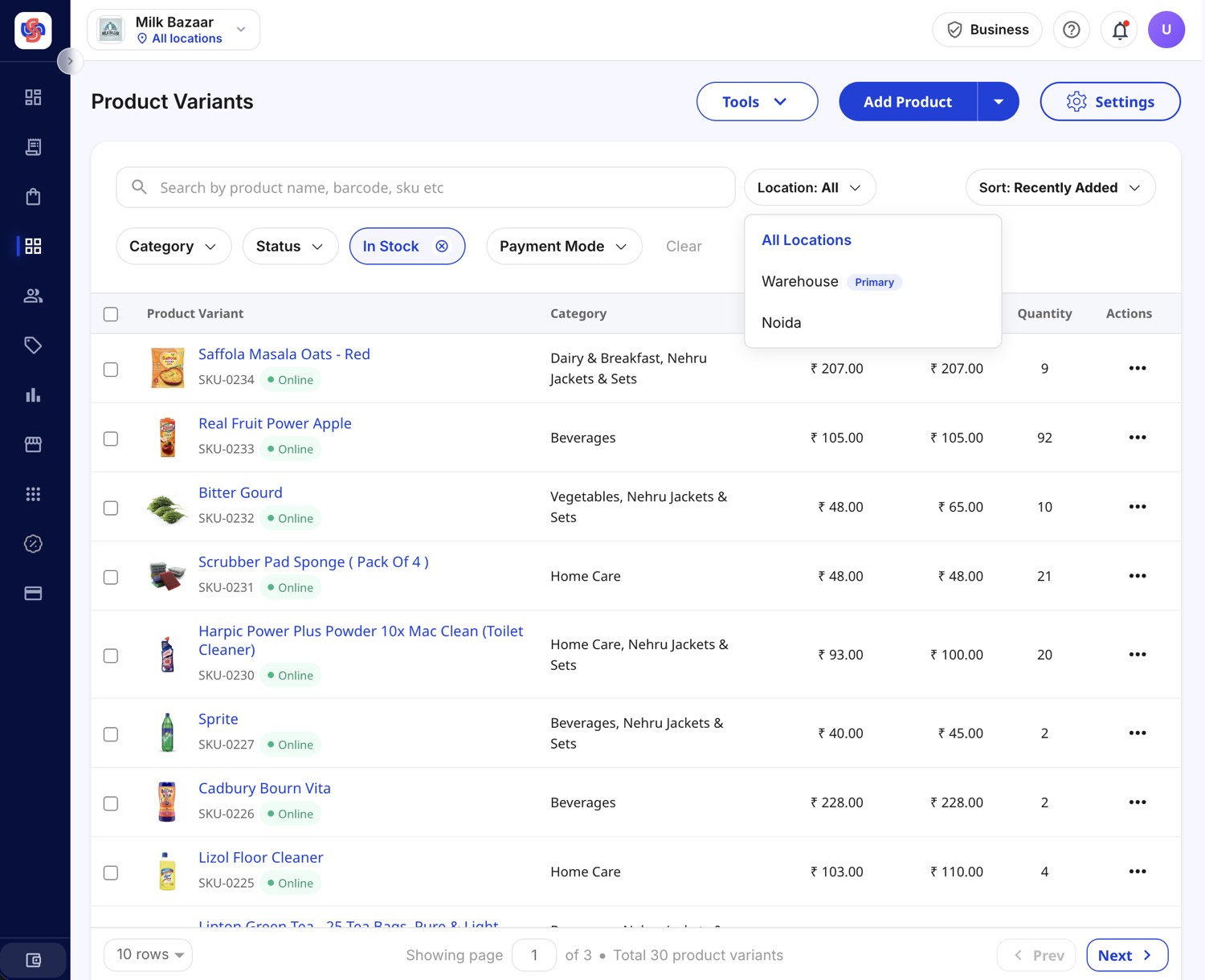 Store-level inventory · per location
 One product, many counts. The warehouse can show 200 units of a SKU while the flagship shop shows 12 and the kiosk shows 0 — all the same product, each location working against its own shelf.
On a multi-location store, what a customer can buy depends on the outlet that serves their area. This is how Ladachi Kulfi’s online store works on Shoopy, across around 25 outlets:
Prices stay central the whole way: every outlet shows the customer the same price, set once by head office. Shoopy can support the same setup for your network — store-level inventory, location-based ordering, order routing and central oversight.
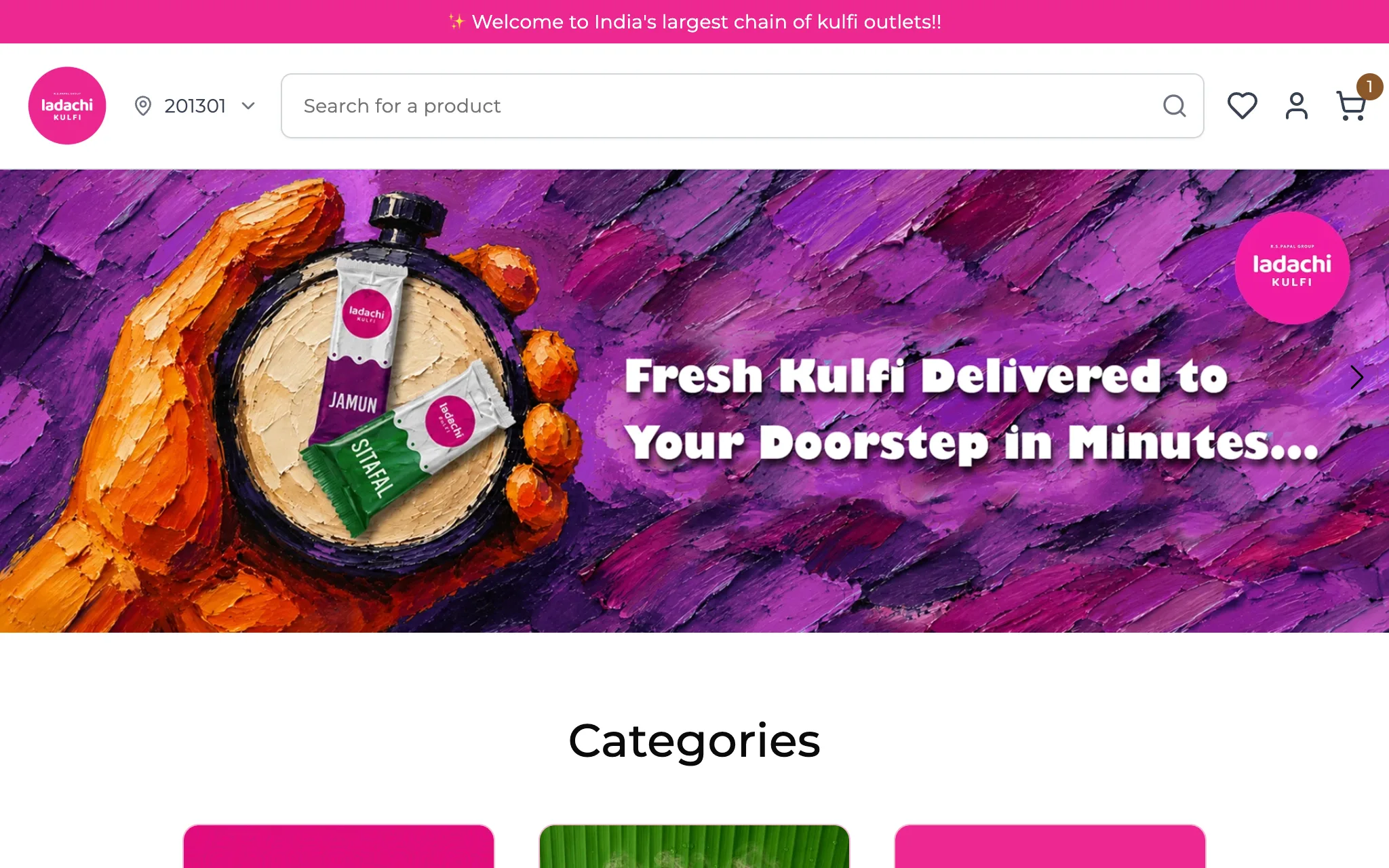 Ladachi Kulfi · built on Shoopy
 Multi-store order fulfilment fails at the edges — the order nobody owns, the outlet that cannot serve it, the payment that lands in the wrong account. In Ladachi Kulfi’s setup, each edge has an answer.
The order lands with the outlet chosen by the customer's area. That outlet prepares it and delivers it. Every outlet sells online directly, and the nearest one delivers quickly.
An order the outlet cannot serve returns to head office, which fulfils it centrally or reassigns it to another outlet. Exceptions get handled; everyday orders are left alone.
Shoopy records which outlet each order belongs to, so the payment from an order reaches the outlet that fulfilled it, with head office keeping its agreed share. That is what makes the model workable for franchise networks.
The division of work is the useful principle: head office keeps the price list, the brand, the exceptions and the settlement rules. Each outlet keeps its own stock, its own orders and its own fulfilment.
Ladachi Kulfi sells kulfi through around 25 outlets that share one Shoopy store. Each outlet holds its own stock; prices stay the same across the brand; a customer orders from the outlet that serves their area, and head office steps in only when an outlet cannot fulfil.
Read the Ladachi Kulfi storyThe same setup works beyond desserts: grocery chains, pharmacies, restaurant brands, electronics retailers, fashion chains and franchise networks. The useful question is not “do you have an online store?” It is: does your online store know which outlet should serve each customer?
More customer storiesEvery location bills from the same product list at the counter, and the day rolls up into one dashboard — not four phone calls and a spreadsheet stitched together at midnight.
Each shop bills customers from the shared catalogue, and the stock it sells is drawn from that shop's own count.
Counter, website, app and WhatsApp orders from every location land in the same list, each drawing stock from the location that fulfils it.
Revenue, top products and order counts — per store and rolled up, daily, weekly and monthly, from wherever you are in the Shoopy business app.
Every staff member gets their own login with a role — 5 staff logins on the Professional plan, 25 on Business — and a Location Admin sees only the locations they run.
What each route gives a growing retail business. Nothing here says one is cheaper for every business; it says what breaks, and where.
| One online store, one stock pool | A separate system per shop | Shoopy | |
|---|---|---|---|
| Stock counted per location | No — one pool for the whole business | Yes, but in disconnected systems | Yes, in one system |
| One catalogue and price list | Yes | No — prices drift between shops | Yes, set centrally |
| The customer sees one store | Yes | No — a store per shop, or none | Yes, one brand and one website |
| Location-based ordering | No — stock has no location | Only shop by shop | Supported — the serving outlet fulfils |
| Sales across every location | One number, no split | Stitched together by hand | One dashboard, per store and rolled up |
| Staff roles per location | — | Per system | Yes — Location Admins see their own |
| Adding location number four | Still one pool | Another system to buy and join | Add it in Settings, Stock In, go |
Multiple store locations come with the Business plan; Professional carries 5 staff logins for a single location, Business carries 25. Plans are billed yearly and differ by product limits, staff logins, apps and, in India, the orders included at 0% fee.
Getting started
Everything you need to start selling online.
500 products · your own domain · WhatsApp cart recovery
₹2,499 per year
0% fee on your first 250 orders a year.
Renews at ₹2,299 a year.
What you get
Most popular
A growing store that wants ads, staff and its own Android app.
Basic + Android app · 5 staff logins · Meta and Google ads
₹5,499 per year
0% fee on your first 500 orders a year.
Renews at ₹4,999 a year.
All of Basic, plus
Best for scale
High-volume sellers, several locations, hands-on support.
Professional + multiple locations · 25 staff logins · store setup
₹12,999 per year
0% fee on your first 1,000 orders a year.
Renews at ₹8,999 a year.
All of Professional, plus
Hands-on help
Complex operations
Custom builds, native apps and a named account manager.
Business + native apps · custom features · account manager
Custom priced to your scale
0% fee on your first 2,000 orders a year.
All of Business, plus
Prices exclude 18% GST. Every plan is billed yearly, carries a 7-day money-back guarantee, and is subject to the fair use policy.
Selling in Nepal or the UAE? See prices in Nepali rupees or dirhams — see supported markets.
Basic ₹2,499 per year
Start 14-day free trialFour steps, in the order that avoids the classic mistake — going live before the second location's stock is initialised.
Your first location is the primary. Add each shop and warehouse in Settings — it needs the Owner or Admin role.
A new location starts at zero for every SKU. Stock In what it actually holds, one product at a time or in bulk from a CSV.
Assign roles per person, and Location Admin roles per branch, so each team sees the location it runs.
The online store, the apps and every counter sell from the same catalogue — with orders in one queue from day one.
The term is used two ways: software that runs several separate storefront websites, and software that runs one online store for a business with several physical locations. Shoopy is the second kind — one store and one catalogue in front, with stock, staff and fulfilment managed per shop, outlet or warehouse behind it.
Yes. Every SKU keeps a separate on-hand count at every location — the warehouse can show 200 units while the flagship shop shows 12. The products list, orders page and dashboard follow the location you pick, and stock is adjusted per location with Stock In and Stock Out.
Yes — that is how Ladachi Kulfi’s store works on Shoopy. The customer sets their delivery pincode, the store matches it to the outlet serving that area, and the customer sees that outlet’s products and stock. Shoopy can support the same location-based setup for other networks.
In a location-based setup, the order goes straight to the outlet chosen by the customer’s area — not through a central warehouse. If that outlet cannot fulfil it, the order returns to head office, which fulfils it centrally or reassigns it to another outlet.
No. Once the serving outlet is set, the cart belongs to it. One order, one outlet — which avoids split deliveries, double settlements and wrong stock counts.
Yes — one catalogue behind every counter, the website and the apps. Prices, photos and descriptions are set once, centrally; stock is the only thing counted per location.
Yes. Each shop bills customers at its counter from the shared catalogue, and the website, apps and counters all draw from that location’s own stock count — so a sale at the counter and a sale online never promise the same unit twice.
Yes. A Location Admin sees only the locations assigned to them and cannot switch to one they do not run. Owners and Admins see every location and the rolled-up picture.
In two steps: Stock Out at the source location, then Stock In at the destination. There is no built-in transfer tool, and adding a new location never redistributes stock automatically — a new location starts at zero until you Stock In.
Multiple store locations come with the Business plan, which also carries 25 staff logins. Professional carries 5 staff logins for a single location. If you are close to opening a second shop, Business is the plan to compare.
Yes — the model is one brand and price list from the centre, with each branch or franchise outlet running its own stock, orders and fulfilment. Shoopy records which outlet each order belongs to, so settlement can follow the outlet that fulfilled it. Ladachi Kulfi runs around 25 outlets this way.
A thirty-minute demo — how the second location bills, counts and reports without a second system.