 Shoopy
 Glossary of Shoopy terms
A quick reference for Shoopy-specific terms — Variant, Collection, Wallet, Contract, Agency and more — so you can navigate the admin without guessing.
Shoopy has its own vocabulary — words like Variant, Contract, and Multipack have a very specific meaning. This page defines the most common Shoopy terms, grouped by admin area, and each entry points to the right sidebar module so you know where to look. The same terms work on web.shoopy.in and on custom-domain stores like www.aziri.in and www.instaecart.com.
Before you begin
- This glossary is a simple reference — you don’t need any special permissions.
- A module may be hidden for your role, or gated by your plan. Ask the owner for access if a module is missing.
- New to Shoopy? Start with A tour of the Shoopy admin panel first.
Catalog terms
Shoopy’s catalogue uses a few overlapping terms. This section makes them clear.
Product structure
Product — a sellable item in your catalogue; the umbrella for everything else. A product can be one item with one price, or hold variants, bundles, or multipacks. Manage products under Catalog → Products.
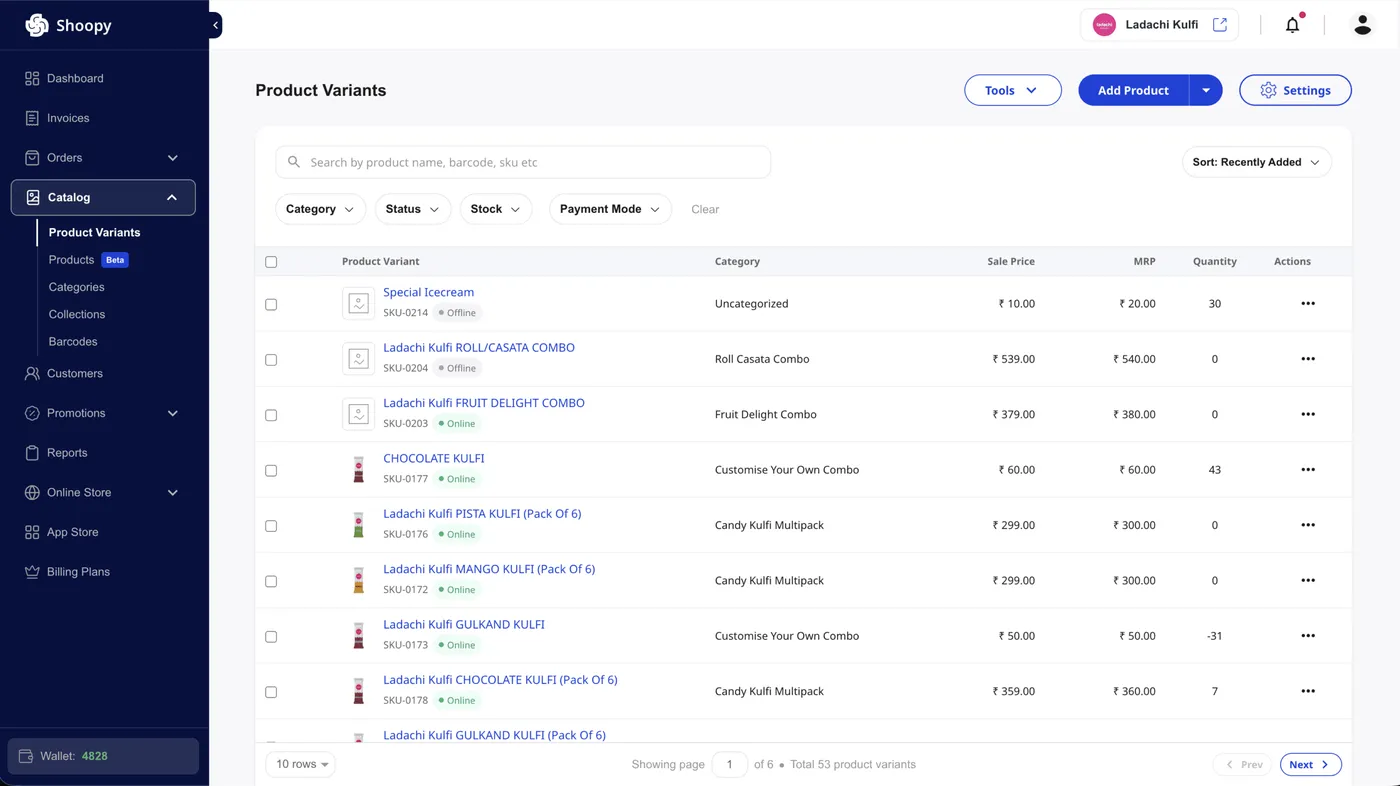
Variant (Product Variant) — one SKU-level option inside a product. “T-shirt · Red · Medium” is a variant. Each variant has its own price, stock, and barcode. A fashion store like www.aziri.in typically uses variants for size and colour. Manage them under Catalog → Product Variants.
Bundle — a group of products or variants sold as one package, like a “Gift Hamper”. You set up bundles inside a product.
Multipack — a pack of the same product sold together, like “Soap × 5” or “12-pack Cola”. You set up multipacks inside a product.
Stock identifiers
SKU (Stock Keeping Unit) — a unique code for each variant, so your inventory system can track each item. You need an SKU to print a barcode.
Barcode — a machine-readable code tied to a variant. Your POS scans it at checkout, and your team uses it for stock audits. Manage barcodes under Catalog → Barcodes.
Attribute (Additional Field) — a custom field on a product or variant, like “Colour”, “Material”, or a size chart. You add attributes from the product’s edit screen.
Grouping
Category — a taxonomy node that groups products. “Men → Shirts → Formal” is a category path. Each product belongs to one category. Manage categories under Catalog → Categories.
Collection — a curated set of products that doesn’t follow the category tree. “Summer Sale” or “Trending This Week” is a collection. Collections can be manual, category-based, or HTML-defined. Find them under Catalog → Collections.
Orders and invoicing terms
Order — a customer purchase from your store. Staff can also create a manual order. Track orders under Orders → Online.
Purchase Order (PO / Purchase) — an inbound order to your supplier that restocks your inventory. In contrast, a customer Order moves stock out. Manage POs under Orders → Purchase.
Estimate — a draft quote that goes out before the customer buys. An estimate becomes an invoice on confirm. Find them under Orders → Estimate.
Invoice — a billing document for a confirmed sale, separate from the Order record. One Order can have many Invoices — for example, with partial shipments. Manage them in the Invoices module.
Abandoned Cart — a cart that never checked out. Shoopy tracks them for you, so you can recover lost sales with reminders. Find them under Orders → Abandoned Carts.
Return — a return request from a customer. You can refund to the original method or the wallet. Set return rules under Online Store → Store Settings → Returns.
Customer and money terms
Customer — a buyer in your store. Shoopy tracks their profile, orders, and wallet. Manage them under Customers.
Customer Wallet — a prepaid or loyalty balance for one customer. Customers top up, earn, or spend it at checkout. Set wallet rules under Customers → Wallet Settings.
Wallet Points (Credit Points) — a loyalty currency your customers earn when orders hit certain statuses. For example, ₹1 spent can equal 1 point. This is not the same as your own Shoopy Credits — don’t mix up the two.
Refer & Earn — Shoopy’s built-in referral program. Existing customers invite new ones, and both sides earn points or discounts. Set it up under Promotions → Refer & Earn.
Coupon — a discount code used at checkout. Coupons support percent-off, flat-off, and BOGO deals. Manage them under Promotions → Coupons.
Banner — a promo image or HTML block on your store, like a homepage hero. Find banners under Promotions → Banners.
Online store and setup terms
Storefront — the buyer-facing side of your store: the public site and app your buyers see. In contrast, the admin is the panel you and your staff use.
Theme — the visual template for your storefront; it sets the look and layout. Pick themes under Online Store → Themes, and tweak colours and fonts under Online Store → Display Settings.
Custom Domain — a domain you own mapped to your store, so yourstore.com replaces web.shoopy.in in the URL and the store gets its own branded experience. www.instaecart.com runs on Shoopy on its own domain.
Store Location — a physical outlet, warehouse, or fulfilment point. You hold stock at each location, and each has its own inventory and staff. Manage them under Online Store → Store Locations. Multi-location unlocks only on a supported plan.
Store Switcher — the header control with your store’s logo and name. It lets you jump between your stores without logging in again.
Users and access terms
User (Staff) — anyone with login access who isn’t a customer: owners, managers, cashiers, and support are all staff. Manage users under Online Store → Users & Roles.
Role — a bundle of permissions. A “Catalog Manager” role can edit products but can’t see Billing. Create roles under Online Store → Users & Roles.
Staff Seat — one billable user slot on your plan. Each plan caps the number of seats — Professional gives up to 5 and Business up to 25.
Location Admin — a staff role scoped to chosen locations. A location admin sees read-only products and manages inventory only for their locations, which fits outlet managers. In contrast, a full admin sees every location.
Agency — a Shoopy reseller or partner, typically managing many stores for clients. Agencies sign up through a separate flow and get tools like fund transfers and client dashboards.
Subscription terms
Subscription Plan (Recurring Plan) — a template for recurring orders, like “Coffee, 250g, every 2 weeks”. Manage templates under Subscription → Plans.
Contract (Subscription Contract) — an active recurring deal with a customer. Shoopy makes a contract when the customer subscribes; contracts track deliveries, pauses, and cancellations. Find them under Subscription → Contracts.
Plan and billing terms
Billing Plan (Plan / Subscription Tier) — your Shoopy pricing tier. Shoopy offers Basic, Professional, and Business plans, and each tier unlocks more products, seats, and features. Compare plans under Billing Plans. For details, see Choosing your Shoopy plan.
App Store — Shoopy’s add-on marketplace, offering extra payment gateways, shipping tools, and more. Find it in the sidebar.
Shoopy Credits (Wallet) — your merchant-side store credit, shown at the bottom of the sidebar. You earn credits from referrals and promotions, then spend them on plan upgrades and add-ons. This is not the Customer Wallet, which is the buyer balance.
Communication terms
OTP (One-Time Password) — a short code sent on SMS, WhatsApp, or email to verify your login or a sensitive action. For the full flow, see Logging in with OTP.
Channel — a delivery medium for a message: SMS, WhatsApp, Email, or Push. Shoopy picks the channel based on the event and your plan.
Push Notification (FCM) — an in-app alert sent via Firebase Cloud Messaging, like “Your order has shipped”. Shoopy turns off push on custom-domain admin panels for security.